Showing posts with label photography. Show all posts

Saturday, September 13, 2025

Make a Pond at Shawnee Mission Park with a Trailcam?

 Oh hai!  What six months since I posted?


So, news first. August 9th helped my daughter to unfsck her vintage Honda Accord.  Catalytic heat shield fell off and was dragging on the highway.  Laid down, jacked the car up a bit reached out and banged the metal off the frame. No immediate issues, eh?

Well a day or two later, shooting pain from the hip to the heel on the left leg.  Sciatica. 

It's now one full month and I've got 500 steps, or 4 minutes standing before I have to pop a squat to reset the nerves.  Gah.

 Well, we can still plan for the future!

This post on X (Twitter for us OG's) shows a guy making a pond in a desolate area of a nature preserve, then filming the animals that come!


SO, Shawnee Mission Park has a large unused area that has limited camping and no maintained trails - an ideal place to put a pond and trail cam!  Comment your suggestions for a good HD trail cam with IR night vision!


Wednesday, January 08, 2025

2025 Overland Park Blizzard Wrapup - Photos, news etc

 On January 5th, 2025 the Overland Park, KC Metro, and a wide swath of Middle America endured one of the largest blizzards on recent record.  The KC Metro recorded the 4th largest single day snow totals in recent history.

To start: Photos from my storm album on Flickr


January 5 2025 Blizzard Photos: 1:30 PM 


More content will be coming as I get it created; the slide show will also expand as I upload more photos to Flickr.

Sunday, December 18, 2022

5 Tips on taking good holiday photos


Holiday gatherings are coming soon, and everyone will want a good photo to remember the good times - and all it takes are a few simple steps.  You don't even need fancy cameras, lighting or experience posing people!
 
  1.  Plan ahead: Before you head out on your holiday adventure, take some time to plan out your photo shoots. Think about the types of photos you want to take and the locations where you'll be taking them. This will help you make the most of your time and ensure that you get the shots you want.
  2.  Use natural light: Natural light is your best friend when it comes to taking good holiday photos. Try to avoid using flash whenever possible, as it can create harsh shadows and wash out the colors in your photos. Instead, look for well-lit areas where you can capture the beautiful natural light of your surroundings.
  3.  Get creative with composition: Composition is an important aspect of photography, and it can really make your holiday photos stand out. Try using creative angles, framing, and leading lines to add interest to your photos. You can also experiment with different focal lengths to create a sense of depth and perspective. (You can fake this in the 'pro' mode of your cell phone camera!)
  4. Edit your photos: While it's important to get the best possible shot straight out of the camera, editing your photos can take them to the next level. Use a photo editing program to adjust the exposure, contrast, and colors in your photos to make them pop. Just be sure to keep your edits subtle, as over-editing can ruin a good photo. (Google Photos is a great free editor for your phone, and gets it right more often than not!)
  5. Have fun: Above all, remember to have fun when taking holiday photos. Don't worry about getting the perfect shot every time; just enjoy the experience and capture the moments that matter to you. By focusing on the joy of the season, you'll end up with photos that truly capture the spirit of the holidays.

May your holiday season be joyful and bright!

Namakar,

Will

Friday, August 21, 2020

Event Photography During Pandemic!


Scouts BSA Eagle Banner
I wrote up a blog on my professional / marketing photography site about doing an event shoot during a 12% infection rate (R=1.5+) pandemic:

https://www.willengland.com/post/event-photography-during-pandemic

Went well.  Dicky lighting - people in the shade of the pavilion, bright sun on the grass outside.  I made sure the cameras were set to center weighted evaluative metering; I had my protegee Alec (oldest son) shooting the stills while I ran the livestream off the LG V60 5G, shot the static video and main audio on the 90D and got closeups and B-Roll on the T3i. 

They said they had a PA system.  I offered to get and set up a proper PA system.  They declined.  So I set the Sennheiser mic to low sensitivity, assuming they'd run the PA like I run PA.  No.  Just barely audible on the camera, 20 feet back from the 'mains'.  And they had the mics in front of the mains, so they had to keep it turned way down to prevent feedback.  Le Sigh. If'n we ever do this again, I'm not giving them an option to do  their own PA, I'm doing it.  Pair of dual 12 powered cabs on poles, in front of the wired mic. We had a lot of senior citizens sitting in the back of the pavilion or outside on the grass properly socially distancing, and I guarantee they couldn't hear anything being said.  Shoot your video, photos and sound for the lowest common denominator - the 80 year old with a hearing aid.  Those are the folks that this stuff matters to - the kids won't look at it until they are 80, the parents just want to share it to the grandparents who couldn't be there (who are 80), and the 80 year olds that risk their life to show up -- make sure they can see and hear the damn thing.  :-)

Anyway, rant off - it was a good time; check out a few of the photos: https://www.eagle-court-of-honor.willengland.com/ 

- Will England

Friday, July 24, 2020

In The Moment - Photography

Often your best photographs come 'in the moment' - tonight, SamTheDog was in the moment and noticed a doe and two fawns walking the back 40. I let him out, distracted and unaware of the deer. Once he took off down the steps, I looked for what he was chasing - deer! I fortunately keep the camera with long zoom on the table beside the back door just for such situations, and was able to capture the doe:

Doe in Suburban Back Yard

Later, after I let SamTheDog back in, I was closing down for the evening, pulling the curtains shut, and what do I see? The fawns and doe in the yard directly behind ours. Again - being aware of what's around you allows you to capture the most interesting images.

Yearling Fawns In Suburban Back Yard

So there you have it - amazing photos of the wonder of nature in the center of the suburbs.

Will England, Lensman

Thursday, November 07, 2019

How to select multiple photos and edit / delete in Flickr


As times pass, you will find that some chunks of photos are no longer relevant, or you no longer want to display them on Flickr publicly -- changes in jobs, relationships, organizations, or just a bunch of 'potatoe' photos.

The simplest way to find and edit or delete photos from Flickr is to log in, then go to your Camera Roll. From there you find a nice data selector running down the left side of the screen, so you can quickly scroll to the timeframe you want to modify.

Click each photo you want to change, or click 'Select All' for the date - they'll appear in a bin at the bottom of the screen.  Given it's a web app, I suggest keeping your selections relatively small - less than 50 or 100 images at a time. From there, you can lock (set the privacy to only you for visibility), Edit, Add to Album or Delete. Over the course of a lazy Saturday morning you can easily remove or hide hundreds of photos, keeping your curated photo roll clean and reflecting the best of what you want to showcase.

Sometimes, it's easier to select the entire day, then unselect the few images you wish to keep.  Unfortunately, after each delete Flickr resets the camera roll to the top of the date list, so you have to drill back down to find the next date to update.

I hope this helps others - the answers on the Flickr discussion board were less than clear, so I felt a quick visual blog post on bulk editing, mass deletion, or changing the privacy of many photos in your Flickr account was appropriate.

- Will England

Saturday, November 17, 2018

LG V40 ThinQ Triple Shot Demonstration - Sprint Product Ambassadors

With three excellent cameras on the back of the LG V40 ThinQ, each having their own zoom range, you can take some pretty interesting photos.  One cool feature is the ability to create a brief video with all three cameras!  Check out how this works in this video:


I can see a lot of potential beyond filming a brick - from 'I Was There' to even more artistic creation with this excellent camera feature on the LG G40 ThinQ!

-  Will England

The Product Ambassadors are Sprint employees from many different parts of the company that love technology. They volunteer to test out all sorts of Sprint devices and offer opinions freely to the Community. Each Product Ambassador shares their own opinions of these devices, therefore the information in this post does not necessarily reflect the opinions of Sprint. The PA's do not represent the company in an official way, and should not be expected to respond to Community members in an official capacity. #sprintemployee

Wednesday, June 20, 2018

Moto E5 Plus Photo Comparison - Sprint Product Ambassadors

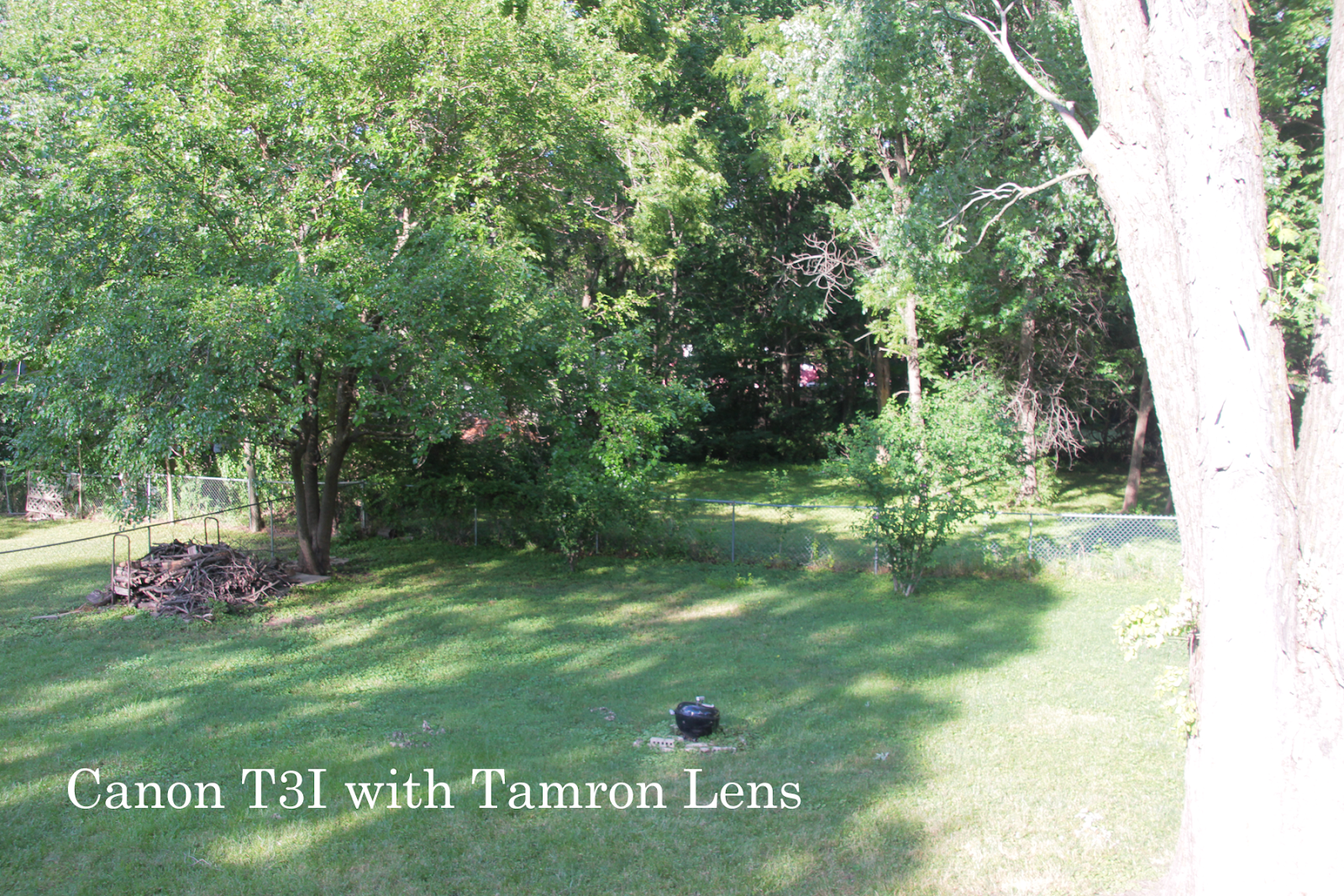
A couple of posts ago we saw a photo comparison where the photos from the E5 looked dull and washed out compared to a premium phone.  So I had to try it -- I shot photos from my Samsung Galaxy S8, the Moto E5 (both automatically set to HDR) and my long in the tooth Canon T3i DSLR. All photos were processed through Adobe Photoshop Elements to resize them to 1800px wide and add the text; no other corrections were done.


First, the 'Reference Shot' from the Canon T3i - washed out.  Evaluative metering couldn't handle the bright sun on the tree and the dark shadows in the back corner.  But I wanted to keep the composition the same - for a better shot, you'd eliminate some of the contrast.


Next up, the Samsung Galaxy S8.  Much better job with the auto HDR - shot with no changes to the settings, just point and shoot, keeping the composition the same.


Finally, the Moto E5 Plus.  A bit darker in the dark areas, but the brightly lit tree has better definition.  All in all, the Moto E5 Plus will shoot.  I have no complaints about the 12 MP camera outdoors.


- Will England, Sprint Product Ambassador  #sprintemployee

The Product Ambassadors are Sprint employees from many different parts of the company that love technology. They volunteer to test out all sorts of Sprint devices and offer opinions freely to the Community. Each Product Ambassador shares their own opinions of these devices, therefore the information in this post does not necessarily reflect the opinions of Sprint. The PA's do not represent the company in an official way, and should not be expected to respond to Community members in an official capacity. #sprintemployee

Wednesday, August 09, 2017

Creating Spot Color Photos on the Moto Z2 Force - Sprint Product Ambassador

You've all see the artistic photos where the foreground subject is in color, while the background is black and white - now see how to create them easily on the Moto Z2 Force!  Just watch this short video explaining how to use the Depth Enabled camera to create spot color photos right on your phone.


 The Product Ambassadors are Sprint employees from many different parts of the company that love technology. They volunteer to test out all sorts of Sprint devices and offer opinions freely to the Community. Each Product Ambassador shares their own opinions of these devices, therefore the information in this post does not necessarily reflect the opinions of Sprint. The PA's do not represent the company in an official way, and should not be expected to respond to Community members in an official capacity. #sprintemployee

Saturday, November 12, 2016

A nice shot of Scoutmaster Monty

Just something about the western feel of this image of Troop 387 Scoutmaster Monty appealed to me.  I cropped it a touch and applied an 'Instant' filter to it for the vintage look.  Out at Gobblepalooza November campout, 2016.


Shot with Canon Rebel T3i, Tamron 28-270 lens at 220mm, F7.1, 1/400 sec.  
Photo courtesy W&N Photograpy, under CC-BY attribution.  
Original photographer Will England

Friday, November 11, 2016

Alec playing Saxophone at Hy-Vee for Veterans Day

Alec was invited with the Shawnee Mission West Band to play at a Hy-Vee for their Veterans Day Breakfast.  One of the coolest, and yet oddest, concerts I've been to.  The whole band clustered around the Deli counter while the veterans had tables to sit at with a (great) free breakfast.  Alec rocked out!


Saturday, August 08, 2015

Google Photos Unlimited Storage, At Reduced Quality

SO, I was curious how 'reduced' the quality was going to be on the Google Photos Unlimited Storage offer.  They claim anything up to 16 megapixels is essentially unchanged.

So I posted a photo to the unlimited storage, compared it to an iPhoto export and to the original JPEG.

Google reduced the file size to 1.1 megabytes.
iPhoto Export reduced the file size to 2.2 megabytes.
The original photo was 4.4 megabytes.

All photos remained 16 megapixels in size at 72dpi.

But how does it look at 100% crop?

See for yourself - which image is original, and which came from Googles' compression?


I'm satisfied.


(spoiler: Left is Google, Center is original, right is iPhoto export)

Tuesday, August 04, 2015

Monday, February 23, 2015

Will England's Year in Photos 2014

What a fantastic year - I'd forgotten about some of these events, all captured from auto-backed up photos from my mobile phone.  Too cool!


Saturday, November 22, 2014

The Only Lighthouse in Kansas

Kansas has a lighthouse?  In the middle of flyover country?  Ah yup!  Just a few miles North of us, where I-635 crosses the Missouri River, you can find a lighthouse guarding the Kansas Water Intake.  I found it while researching photo tags for a motorcycle tag game.  No way to get your motorcycle in the photo, but I've always wanted to get some photos.  Today, I was on the way back from Parkville, picking Robyn up from her Venturing Leadership program, and we stopped to hike in to the river and take some photos. You can't get near the lighthouse on the Kansas side - all fenced off by the KS Bureau of Public Utilities.  But you supposedly can get some nice shots from the Missouri side of the river, where  there's public trails.

We had an hour before sundown, so we pulled out at the levy and set across the tall grass to find the bank of the Missouri River and get a few photos of the lighthouse.   Success!  Robyn made a walking stick and we bushwacked to the river!


We'd found out about the lighthouse originally from the Lighthouses of the US directory, which lists it as the Missouri River Lighthouse, Kansas City Water Intake, lighthouse USCG 5-19505.   It's owned by the Kansas City Board of Public Utilities.  The Directory notes it's still active, although we did not see any lights while photographing it.  A close crop shows it in need of repair and paint; it may have been decommissioned since the directory was last updated:


Perhaps tomorrow I'll get back out with some longer glass and get better detail shots of the lighthouse!


Thursday, August 30, 2012

Minuteman Missile Silo Photos

A couple photos from the Minuteman Missile Natl Park from my visits in 2011 and 2009.

Control Panel


Missile Replica in the Silo


Preserved Silo


Sunday, August 26, 2012

Whitebalance Fail

Was playing with the new (to me) Canon 300D this weekend and set a custom white balance for the very yellow 'soft white' CFL bulbs in the living room.  Ambient light shots in the living room came out great.  The dear wife claims my shot of her in the living room looks like a studio shot.  Then I did some other shots, without changing the white balance.

With the on-camera flash:

Flash photo while using custom white balance for 3000k CFL lamp. Fail.

In the boy's bedroom with his 5000K 'Daylight' CFL lamp for backlighting:

Backlit 5000k (daylight) CFL with custom white balance set for 3000k CFL.  Fail, but interesting fail.

And a gorgeous blue cast fail with the same 'Daylight' CFL for side lighting:

Gorgeous blue fail - 5000k CFL lighting while using custom white balance for 3200k.

Lessons learned?  You can get cool effects with custom white balance.  Reminds me of the old film days where you'd use tungsten film outdoors, or outdoor film under tungsten lamps.   Also, reset your settings before you change lighting situations.

Friday, June 01, 2007

Capulin Volcano at sunset


Capulin Volcano at sunset
Originally uploaded by kcsporttour
Rode out to New Mexico over Memorial Day weekend. As usual for a motorcycle trip, it rained. And rained. And rained some more. I finally broke out of the rain just over the NM border on US64. The sun was just setting behind the Cauplin Volcano and I snapped a few shots before heading on into Raton to meet the rest of the HSTA crew.