Just how do you expand the memory on the Samsung Note 8? Or change out the SIM Card? Simple - watch below. The Note 8 doesn't support 'Adaptable storage' from Google, but instead lets you store your photos, videos, or external movies and music on it and easily remove the card to copy to your computer or more. According to Samsung, the maximum card you can add is 256 GB. However, there may not be a technical limitation, just that was the largest available a few months ago. If someone has a spare $250 to buy the 400GB SanDisc to test, feel free to comment if it works!
The Product Ambassadors are Sprint employees from many different parts of the company that love technology. They volunteer to test out all sorts of Sprint devices and offer opinions freely to the Community. Each Product Ambassador shares their own opinions of these devices, therefore the information in this post does not necessarily reflect the opinions of Sprint. The PA's do not represent the company in an official way, and should not be expected to respond to Community members in an official capacity. #sprintemployee
Tuesday, October 31, 2017


Spigen Thin Armor Case for the Samsung Note 8 - Sprint Product Ambassadors
With one of the highest prices for a phone on the market you will want to protect it - we've always liked the Spigen cases; follows is a quick review of the Thin Armor case from Spigen. While the case was provided at no cost, no compensation was received for this review or video,
The Product Ambassadors are Sprint employees from many different parts of the company that love technology. They volunteer to test out all sorts of Sprint devices and offer opinions freely to the Community. Each Product Ambassador shares their own opinions of these devices, therefore the information in this post does not necessarily reflect the opinions of Sprint. The PA's do not represent the company in an official way, and should not be expected to respond to Community members in an official capacity. #sprintemployee
The Product Ambassadors are Sprint employees from many different parts of the company that love technology. They volunteer to test out all sorts of Sprint devices and offer opinions freely to the Community. Each Product Ambassador shares their own opinions of these devices, therefore the information in this post does not necessarily reflect the opinions of Sprint. The PA's do not represent the company in an official way, and should not be expected to respond to Community members in an official capacity. #sprintemployee
Samsung Galaxy Note 8 Unboxing - Sprint Product Ambassadors
The newest Note from Samsung, the Note 8! What comes in the box with the Samsung Note 8? Watch and find out in this unboxing from the Sprint Product Ambassadors
The Product Ambassadors are Sprint employees from many different parts of the company that love technology. They volunteer to test out all sorts of Sprint devices and offer opinions freely to the Community. Each Product Ambassador shares their own opinions of these devices, therefore the information in this post does not necessarily reflect the opinions of Sprint. The PA's do not represent the company in an official way, and should not be expected to respond to Community members in an official capacity. #sprintemployee
The Product Ambassadors are Sprint employees from many different parts of the company that love technology. They volunteer to test out all sorts of Sprint devices and offer opinions freely to the Community. Each Product Ambassador shares their own opinions of these devices, therefore the information in this post does not necessarily reflect the opinions of Sprint. The PA's do not represent the company in an official way, and should not be expected to respond to Community members in an official capacity. #sprintemployee
Thursday, October 26, 2017
Configure the Home Touch Buttons on the LG GPad F2 8.0 - Sprint Product ...
Quick tutorial video on configuring and using the Home Touch Buttons - with a short demo of the multi-window multi-tasking on the LG GPad F2 8.0. Watch for more on how to configure up to 5 shortcut buttons!
The Product Ambassadors are Sprint employees from many different parts of the company that love technology. They volunteer to test out all sorts of Sprint devices and offer opinions freely to the Community. Each Product Ambassador shares their own opinions of these devices, therefore the information in this post does not necessarily reflect the opinions of Sprint. The PA's do not represent the company in an official way, and should not be expected to respond to Community members in an official capacity. #sprintemployee
The Product Ambassadors are Sprint employees from many different parts of the company that love technology. They volunteer to test out all sorts of Sprint devices and offer opinions freely to the Community. Each Product Ambassador shares their own opinions of these devices, therefore the information in this post does not necessarily reflect the opinions of Sprint. The PA's do not represent the company in an official way, and should not be expected to respond to Community members in an official capacity. #sprintemployee
LG GPad F2 8.0 Home Screen Demo - Sprint Product Ambassadors
A look at how the home screens work including folder creation and working around the missing App Tray on the LG GPad F2 8.0.
The Product Ambassadors are Sprint employees from many different parts of the company that love technology. They volunteer to test out all sorts of Sprint devices and offer opinions freely to the Community. Each Product Ambassador shares their own opinions of these devices, therefore the information in this post does not necessarily reflect the opinions of Sprint. The PA's do not represent the company in an official way, and should not be expected to respond to Community members in an official capacity. #sprintemployee
The Product Ambassadors are Sprint employees from many different parts of the company that love technology. They volunteer to test out all sorts of Sprint devices and offer opinions freely to the Community. Each Product Ambassador shares their own opinions of these devices, therefore the information in this post does not necessarily reflect the opinions of Sprint. The PA's do not represent the company in an official way, and should not be expected to respond to Community members in an official capacity. #sprintemployee
Wednesday, October 25, 2017
LG GPad F2 8.0 Camera Overview - Sprint Product Ambassadors
The box only advertises a 5 megapixel rear camera - is that right? We walk through the camera settings and features in this video to see how it all works! Watch to find out more!
The Product Ambassadors are Sprint employees from many different parts of the company that love technology. They volunteer to test out all sorts of Sprint devices and offer opinions freely to the Community. Each Product Ambassador shares their own opinions of these devices, therefore the information in this post does not necessarily reflect the opinions of Sprint. The PA's do not represent the company in an official way, and should not be expected to respond to Community members in an official capacity. #sprintemployee
The Product Ambassadors are Sprint employees from many different parts of the company that love technology. They volunteer to test out all sorts of Sprint devices and offer opinions freely to the Community. Each Product Ambassador shares their own opinions of these devices, therefore the information in this post does not necessarily reflect the opinions of Sprint. The PA's do not represent the company in an official way, and should not be expected to respond to Community members in an official capacity. #sprintemployee
LG GPad F2 8.0 Tablet Unboxing - Sprint Product Ambassadors
Unboxing the affordable and powerful LG GPad F2 8.0 Tablet from Sprint. Watch to find out what comes in the box and what the tablet looks like!
The Product Ambassadors are Sprint employees from many different parts of the company that love technology. They volunteer to test out all sorts of Sprint devices and offer opinions freely to the Community. Each Product Ambassador shares their own opinions of these devices, therefore the information in this post does not necessarily reflect the opinions of Sprint. The PA's do not represent the company in an official way, and should not be expected to respond to Community members in an official capacity. #sprintemployee
The Product Ambassadors are Sprint employees from many different parts of the company that love technology. They volunteer to test out all sorts of Sprint devices and offer opinions freely to the Community. Each Product Ambassador shares their own opinions of these devices, therefore the information in this post does not necessarily reflect the opinions of Sprint. The PA's do not represent the company in an official way, and should not be expected to respond to Community members in an official capacity. #sprintemployee
Thursday, October 19, 2017
Moto e4 Plus Wrapup - Sprint Product Ambassadors
I've been using the Moto e4 Plus for several weeks now, coming directly from the Moto Force z2 and I find that I don't miss many of the high end features of the Force. The screen is the same size as the top-end phones (Force z2, Galaxy S8 etc) and the battery is far far better. As a matter of fact, the battery is one of the best features of the phone. I've easily went an entire campout shooting photos and keeping up with work via email and not had to dig out a battery pack to recharge the phone. The Mediatek processor is optimized for low power consumption, combined with 5,000 mAh of power gives you staying power for this phone.
The e4 Plus offers the same accurate fingerprint sensor as the Force Z2 at the bottom of the screen and the same Moto Gestures for opening the camera (twist twice) and turning on the flashlight (chop down twice) among others. It's very similar to the flagship phones at a much more reasonable price. Improving on the flagship phones is the hand feel - with a metal back and solid build it just feels better to hold than the Force Z2. The large battery may be part of that, adding some heft and solidity to the phone. I didn't get a case for this phone and never felt like I needed one. The phone feels like a premium device at a budget price.
I mentioned I shot some photos on the phone - that's one of my primary uses for a cell phone these days is media capture - photos and videos. While the 13megapixel sensor sounds good, it struggles in low light and indoors, with a bit more added grain. Compared to an older premium phone (Galaxy S4) it is far better with excellent quality. Only when compared to current phones 4 times the price do you notice any dropoff in photo or video quality. Shutter lock time is a bit slower - most likely a factor of the power efficient processor. Plan your shots and don't expect to stop a sporting play in mid-tackle and you'll be fine. Looking at photos or watching videos on the 720p HD screen is fine - bright enough to use in direct sunlight and a fine enough DPI that you'll be hard pressed to tell the difference between this and a super-premium phone.
Audio on the phone is excellent - great call quality, a solid speaker for music or online radio listening and a 3.5mm headset jack to attach any headset or plug into your auxiliary port on your car stereo. Bluetooth audio is supported as well with quick pairing but no audio routing. Once a Bluetooth device is connected, all audio will route to the Bluetooth device until you turn off Bluetooth or the headset.
For a quarter of the price of the current super-premium phones, you're getting longer battery life, a solid hand feel, quality metal build, effective camera, good sound and call quality and enough speed to handle all the daily communication tasks you count on your phone for. Two thumbs up - not just a great kids phone, but a great value in cell phones overall.
- Will England, Sprint Product Ambassador
The Product Ambassadors are Sprint employees from many different parts of the company that love technology. They volunteer to test out all sorts of Sprint devices and offer opinions freely to the Community. Each Product Ambassador shares their own opinions of these devices, therefore the information in this post does not necessarily reflect the opinions of Sprint. The PA's do not represent the company in an official way, and should not be expected to respond to Community members in an official capacity. #sprintemployee
The e4 Plus offers the same accurate fingerprint sensor as the Force Z2 at the bottom of the screen and the same Moto Gestures for opening the camera (twist twice) and turning on the flashlight (chop down twice) among others. It's very similar to the flagship phones at a much more reasonable price. Improving on the flagship phones is the hand feel - with a metal back and solid build it just feels better to hold than the Force Z2. The large battery may be part of that, adding some heft and solidity to the phone. I didn't get a case for this phone and never felt like I needed one. The phone feels like a premium device at a budget price.
I mentioned I shot some photos on the phone - that's one of my primary uses for a cell phone these days is media capture - photos and videos. While the 13megapixel sensor sounds good, it struggles in low light and indoors, with a bit more added grain. Compared to an older premium phone (Galaxy S4) it is far better with excellent quality. Only when compared to current phones 4 times the price do you notice any dropoff in photo or video quality. Shutter lock time is a bit slower - most likely a factor of the power efficient processor. Plan your shots and don't expect to stop a sporting play in mid-tackle and you'll be fine. Looking at photos or watching videos on the 720p HD screen is fine - bright enough to use in direct sunlight and a fine enough DPI that you'll be hard pressed to tell the difference between this and a super-premium phone.
Audio on the phone is excellent - great call quality, a solid speaker for music or online radio listening and a 3.5mm headset jack to attach any headset or plug into your auxiliary port on your car stereo. Bluetooth audio is supported as well with quick pairing but no audio routing. Once a Bluetooth device is connected, all audio will route to the Bluetooth device until you turn off Bluetooth or the headset.
For a quarter of the price of the current super-premium phones, you're getting longer battery life, a solid hand feel, quality metal build, effective camera, good sound and call quality and enough speed to handle all the daily communication tasks you count on your phone for. Two thumbs up - not just a great kids phone, but a great value in cell phones overall.
- Will England, Sprint Product Ambassador
The Product Ambassadors are Sprint employees from many different parts of the company that love technology. They volunteer to test out all sorts of Sprint devices and offer opinions freely to the Community. Each Product Ambassador shares their own opinions of these devices, therefore the information in this post does not necessarily reflect the opinions of Sprint. The PA's do not represent the company in an official way, and should not be expected to respond to Community members in an official capacity. #sprintemployee
Thursday, October 12, 2017
2017 Shawnee Mission West Marching Band at Homecoming Parade
The 2017 Homecoming Parade start with the ROTC, Dance Team and Shawnee Mission West Pride Marching Band!
Monday, October 09, 2017
Moto z2 Force Speed - Sprint Product Ambassadors
I've been looking and looking for a tower or demo site with the 256 QAM modulation configured to get the gigabit speeds that the Moto Z2 Force is capable of, but none are online yet and my time with the phone has come to an end. However, at 95th and Quivira in Overland Park, KS there is a great antenna with massive MIMO that gave this speed result:

Nearly 200 Mbps download in the middle of the afternoon near a busy mall. Outstanding speed from the Moto Z2 Force. One of the fastest phones on the network and only going to get faster as 256QAM is turned on.
- Will England
The Product Ambassadors are Sprint employees from many different parts of the company that love technology. They volunteer to test out all sorts of Sprint devices and offer opinions freely to the Community. Each Product Ambassador shares their own opinions of these devices, therefore the information in this post does not necessarily reflect the opinions of Sprint. The PA's do not represent the company in an official way, and should not be expected to respond to Community members in an official capacity. #sprintemployee

Nearly 200 Mbps download in the middle of the afternoon near a busy mall. Outstanding speed from the Moto Z2 Force. One of the fastest phones on the network and only going to get faster as 256QAM is turned on.
- Will England
The Product Ambassadors are Sprint employees from many different parts of the company that love technology. They volunteer to test out all sorts of Sprint devices and offer opinions freely to the Community. Each Product Ambassador shares their own opinions of these devices, therefore the information in this post does not necessarily reflect the opinions of Sprint. The PA's do not represent the company in an official way, and should not be expected to respond to Community members in an official capacity. #sprintemployee
Moto Z2 Force Clock Widget Demo - Sprint Product Ambassadors
While the Moto Z2 Force has dozens of advanced features, one I found the most fascinating is the default built in clock widget. Check out all it can do in the following video!
The Product Ambassadors are Sprint employees from many different parts of the company that love technology. They volunteer to test out all sorts of Sprint devices and offer opinions freely to the Community. Each Product Ambassador shares their own opinions of these devices, therefore the information in this post does not necessarily reflect the opinions of Sprint. The PA's do not represent the company in an official way, and should not be expected to respond to Community members in an official capacity. #sprintemployee
The Product Ambassadors are Sprint employees from many different parts of the company that love technology. They volunteer to test out all sorts of Sprint devices and offer opinions freely to the Community. Each Product Ambassador shares their own opinions of these devices, therefore the information in this post does not necessarily reflect the opinions of Sprint. The PA's do not represent the company in an official way, and should not be expected to respond to Community members in an official capacity. #sprintemployee
Managing Storage Space on the Moto Z2 Force - Sprint Product Ambassadors
The Moto Z2 Force comes with 64GB of built in memory, so it's less likely you'll run out of space. If you do want to clear up space, the system storage space manager is quite easy to use and simple. Watch the following video for a quick walkthrough!
- Will England
The Product Ambassadors are Sprint employees from many different parts of the company that love technology. They volunteer to test out all sorts of Sprint devices and offer opinions freely to the Community. Each Product Ambassador shares their own opinions of these devices, therefore the information in this post does not necessarily reflect the opinions of Sprint. The PA's do not represent the company in an official way, and should not be expected to respond to Community members in an official capacity. #sprintemployee
- Will England
The Product Ambassadors are Sprint employees from many different parts of the company that love technology. They volunteer to test out all sorts of Sprint devices and offer opinions freely to the Community. Each Product Ambassador shares their own opinions of these devices, therefore the information in this post does not necessarily reflect the opinions of Sprint. The PA's do not represent the company in an official way, and should not be expected to respond to Community members in an official capacity. #sprintemployee
Friday, October 06, 2017
Moto e4 Plus Back Cover Removal - Sprint Product Ambassadors
Last time we left off in the unboxing I hadn't found out how to remove the back cover on the Moto e4 Plus - turns out it is removable and offers both SIM card and SD card access! Watch below for the how-to and what's under the cover.
The Product Ambassadors are Sprint employees from many different parts of the company that love technology. They volunteer to test out all sorts of Sprint devices and offer opinions freely to the Community. Each Product Ambassador shares their own opinions of these devices, therefore the information in this post does not necessarily reflect the opinions of Sprint. The PA's do not represent the company in an official way, and should not be expected to respond to Community members in an official capacity. #sprintemployee
The Product Ambassadors are Sprint employees from many different parts of the company that love technology. They volunteer to test out all sorts of Sprint devices and offer opinions freely to the Community. Each Product Ambassador shares their own opinions of these devices, therefore the information in this post does not necessarily reflect the opinions of Sprint. The PA's do not represent the company in an official way, and should not be expected to respond to Community members in an official capacity. #sprintemployee
Thursday, October 05, 2017
Unboxing the Moto e4 Plus from Sprint
The new e4 Plus from Sprint just arrived - a new midrange phone with a large 5.5" screen, 5,000 mAh battery and all the features you expect in a smartphone. Let's check out what's in the box!
The Product Ambassadors are Sprint employees from many different parts of the company that love technology. They volunteer to test out all sorts of Sprint devices and offer opinions freely to the Community. Each Product Ambassador shares their own opinions of these devices, therefore the information in this post does not necessarily reflect the opinions of Sprint. The PA's do not represent the company in an official way, and should not be expected to respond to Community members in an official capacity. #sprintemployee
The Product Ambassadors are Sprint employees from many different parts of the company that love technology. They volunteer to test out all sorts of Sprint devices and offer opinions freely to the Community. Each Product Ambassador shares their own opinions of these devices, therefore the information in this post does not necessarily reflect the opinions of Sprint. The PA's do not represent the company in an official way, and should not be expected to respond to Community members in an official capacity. #sprintemployee
Thursday, September 28, 2017
Moto Z2 Force - Keeping the screen scratch free - Sprint Product Ambassadors

Simple! I put a tempered glass screen protector on it from Illumishield. They offer a hard glass screen cover that directly fits the Moto Z2 Force, providing scratch protection and a fingerprint resistant cover for the screen. Now, this isn't a recommendation for any specific brand; they were just the first ones I found on Amazon that claimed to support the brand new Z2 Force.
The screen on the Z2 force is made from a layered glass and polycarbonate composition, the exact nature of which is secret to only Motorola. It's definitely shatterproof as I have dropped it from 4+ feet directly onto the screen on concrete. But it's not as hard as the Gorilla Glass screens on other phones and keys or other things can leave scratches in the screen. I've been quite careful to keep the phone in a pocket with nothing else hard - usually behind my leather wallet - but even so a few small marks were becoming visible. So I ordered the tempered glass screen protector.
I've had less than stellar experiences with screen protectors, but the 0.3mm thick Illumishield has been an exception to the rule. Installation is simple - just clean the screen well with the included alcohol wipe, peel off the sticky back, align the protector to the screen, making sure the small 'U' (shown) lines up with the home button, and drop it in place.

Screen responsiveness and touch have not been impacted with the screen protector on, and after several weeks there's no sign that the tempered glass will peel up or come loose. I'm quite satisfied with the Illumishield protector and recommend it highly.
- Will England
Disclaimer:
The Product Ambassadors are Sprint employees from many different parts of the company that love technology. They volunteer to test out all sorts of Sprint devices and offer opinions freely to the Community. Each Product Ambassador shares their own opinions of these devices, therefore the information in this post does not necessarily reflect the opinions of Sprint. The PA's do not represent the company in an official way, and should not be expected to respond to Community members in an official capacity. #sprintemployee
Moto E4 Plus - Introduction from Sprint Product Ambassadors

These days 'entry level' or 'midrange' smartphones are better than the top of the line phones from just 2 years ago. The Moto e4 Plus is a great example of that! Fast charging, quad core processor, 2GB ram, well, lets look and find out more!
The 5.5" large screen Moto e4 Plus offers a large screen at 1200x720px resolution, a 5,000 mAh battery, good for up to 2 days use, quick charge, and all the latest improvements in smartphones. With a 12 megapixel rear camera and a 5 megapixel front camera this 'midrange' phone outstrips many premium phones of just a few years ago. It supports all the latest radio bands too for fast data speeds, and offers the newest Bluetooth standards for pairing with your car or headset. Still have a wired headset? No worries - the e4Plus still comes with a headphone jack!
The body is made of metal with a slightly curved glass front for appealing aesthetics. The phone, while not waterproof, has a nano coating to allow for splash resistance. Don't submerge it, but if you get caught in the rain you're not going to fry your new phone. Offering a single loudspeaker and dual microphones, it should provide good sound clarity and quality - up to 84dB according to Motorolas specifications. The phone comes in a gold tone or flat grey color to match your personality.
At this price point a few things have been left out - a QHD display is missing as is NFC, so no Android Pay is available on this phone. But with the great specifications, quad core Qualcomm chip and multi-day battery, I think it's going to be a winner for anyone going for a solid Android phone without breaking the bank.
Will England
The Product Ambassadors are Sprint employees from many different parts of the company that love technology. They volunteer to test out all sorts of Sprint devices and offer opinions freely to the Community. Each Product Ambassador shares their own opinions of these devices, therefore the information in this post does not necessarily reflect the opinions of Sprint. The PA's do not represent the company in an official way, and should not be expected to respond to Community members in an official capacity. #sprintemployee
Monday, September 04, 2017
Painting Wallpaper
A friend of mine recalls her challenges in painting over wallpaper - https://brownbungalow.wordpress.com/2017/09/04/just-paint-over-the-wallpaper/
Friday, August 25, 2017
Courage
"Courage doesn't always roar. Sometimes courage is a quiet voice at the end of the day saying, 'I will try again tomorrow.'" -Mary Anne Radmacher
Thursday, August 24, 2017
Eclipse Camping
For a year we've been planning on going somewhere in the line of totality for the August 2017 total solar eclipse. Most of the parks and open spaces were charging an arm and a leg for a parking spot - but we, being a Scouting family, were able to get a reservation at Camp Gieger Scout reservation, for free. Only about 300 people were scheduled to be at the 1,000 acre reservation - no overcrowding here!
The original plan was to go up Saturday with the whole family - but one son had a scout campout with the troop; the other kids were scheduled out with their respective fathers for their weekends. They wouldn't be home till 7PM Sunday. With the eclipse traffic hitting on Monday, we went ahead and set up camp Saturday and planned to come home and fetch kids on Sunday, returning Sunday night.
Sunday comes and goes and we head back up I29 to Saint Joseph, MO for a night of camping. The site had some heavy rain and straight line winds and one ancient tent failed to stay waterproof. Fortunately, I had a spare REI Quarter Dome 1, so it was quickly set up for the middle son.
Monday arrives and boredom sets in with the kids - they aren't used to no-program camping and weren't sure what to make of themselves. They ended up exploring and found toads:

They also left the place better than we found it - using a 'fishing magnet' he built at his dad's they trolled a trail near the campsite and found about a box of decking screws left behind from summer camp:
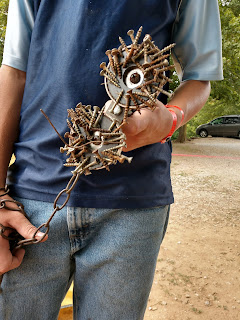
But the morning passed quickly and the eclipse started! We were starting to get socked in by clouds but still able to see the moon eclipsing the sun. Unfortunately, right at 1PM the rain rolled in and heavy clouds blocked the totality from viewing. Even without being able to see the totality, we could easily observe the effects as the bugs started chirping, the light dropped and it appeared to be midnight in the middle of the day:
With the continuing rain and disappointment of missing the totality, we voted and decided to spend the next 4 hours on the road in traffic instead of hanging out in the rain. Wet tents were stuffed and the van loaded back up. May not have been the best choice as traffic was as heavy as I've seen in the country. After a few hours on the road, tempers were short and the typical family roadtrip fussing and fighting broke out. We survived, if not thrived, and returned home by 6PM to watch the eclipse show we recorded on TV at home.
The original plan was to go up Saturday with the whole family - but one son had a scout campout with the troop; the other kids were scheduled out with their respective fathers for their weekends. They wouldn't be home till 7PM Sunday. With the eclipse traffic hitting on Monday, we went ahead and set up camp Saturday and planned to come home and fetch kids on Sunday, returning Sunday night.
 |
| Panorama of the campsite |
Sunday comes and goes and we head back up I29 to Saint Joseph, MO for a night of camping. The site had some heavy rain and straight line winds and one ancient tent failed to stay waterproof. Fortunately, I had a spare REI Quarter Dome 1, so it was quickly set up for the middle son.
Monday arrives and boredom sets in with the kids - they aren't used to no-program camping and weren't sure what to make of themselves. They ended up exploring and found toads:


But the morning passed quickly and the eclipse started! We were starting to get socked in by clouds but still able to see the moon eclipsing the sun. Unfortunately, right at 1PM the rain rolled in and heavy clouds blocked the totality from viewing. Even without being able to see the totality, we could easily observe the effects as the bugs started chirping, the light dropped and it appeared to be midnight in the middle of the day:
 |
| Campsite at totality - 1:10 PM |
With the continuing rain and disappointment of missing the totality, we voted and decided to spend the next 4 hours on the road in traffic instead of hanging out in the rain. Wet tents were stuffed and the van loaded back up. May not have been the best choice as traffic was as heavy as I've seen in the country. After a few hours on the road, tempers were short and the typical family roadtrip fussing and fighting broke out. We survived, if not thrived, and returned home by 6PM to watch the eclipse show we recorded on TV at home.
Not an optimal weekend - bad schedules, bad weather, etc - but still memorable. And possibly our last family vacation before the oldest daughter goes off to college next year!
Your humble correspondent,
- Will England
Wednesday, August 09, 2017
Creating Spot Color Photos on the Moto Z2 Force - Sprint Product Ambassador
You've all see the artistic photos where the foreground subject is in
color, while the background is black and white - now see how to create
them easily on the Moto Z2 Force! Just watch this short video
explaining how to use the Depth Enabled camera to create spot color
photos right on your phone.
The Product Ambassadors are Sprint employees from many different parts of the company that love technology. They volunteer to test out all sorts of Sprint devices and offer opinions freely to the Community. Each Product Ambassador shares their own opinions of these devices, therefore the information in this post does not necessarily reflect the opinions of Sprint. The PA's do not represent the company in an official way, and should not be expected to respond to Community members in an official capacity. #sprintemployee
The Product Ambassadors are Sprint employees from many different parts of the company that love technology. They volunteer to test out all sorts of Sprint devices and offer opinions freely to the Community. Each Product Ambassador shares their own opinions of these devices, therefore the information in this post does not necessarily reflect the opinions of Sprint. The PA's do not represent the company in an official way, and should not be expected to respond to Community members in an official capacity. #sprintemployee
Subscribe to:
Posts (Atom)